Track HOA maintenance requests and vendor work
Residents report common-area problems by email, QR code, or web form. Property managers assign the work to vendors, board members can review open cases on a map, and the community keeps the maintenance history when staff or board members change.
Designed for HOAs and condominium associations. Residents use it in their browser, with no app to install.
Where maintenance requests get lost
Residents already send emails and photos when something needs attention. The gaps appear after that: requests are forwarded between inboxes, copied into spreadsheets, and passed to vendors without a consistent record.
Requests Stay in the Inbox
An email thread is difficult to count or compare with earlier work. Managers and boards have no reliable answer when someone asks how many gate repairs were reported last quarter.
Residents Cannot Check the Status
Without a case number or status page, residents do not know whether a message arrived or was assigned. They email again or ask a board member.
Vendors Get Partial Information
When photos, locations and replies sit in different inboxes, contractors receive incomplete forwards and managers reconstruct the request by hand.
How a request moves through the system
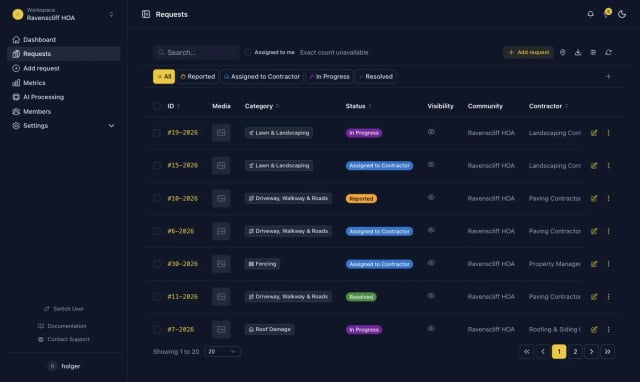
Each request keeps its location, photos, assignment, and status in one case history.
The Resident Sends a Request
Residents use a community link, scan a QR code at the property, or send an email. Web and QR reports are submitted directly; emails enter an intake queue with their attachments and sender details.
Mark-a-Spot Prepares the Details
For web and QR reports, AI can suggest a category, prepare a short description, and flag a potential hazard. The resident reviews the details before submitting. A manager reviews emailed reports before turning them into cases.
The Manager Assigns the Work
After a report becomes a case, a property manager or board member assigns it to a committee or vendor. The vendor receives the job with photos and location, instead of a forwarded email thread.
Residents and Boards See the Status
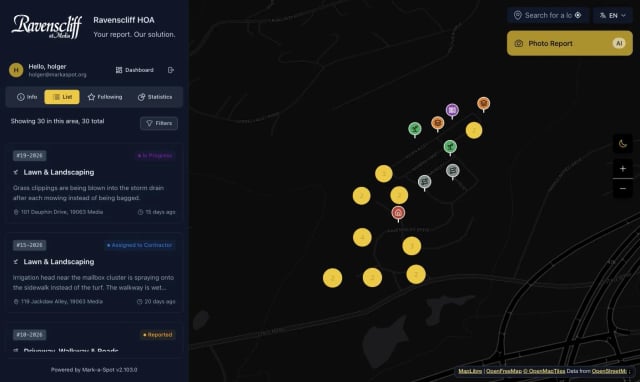
Residents receive status updates by email in the community's branding. Managers use the work queue, while board members can review the map, statistics, and case history.
Connect the maintenance inbox your community already uses. Each message arrives with its attachments and sender details. If the location is missing, an automatic reply asks the resident to add it. A manager reviews the message before creating a work item, which keeps incomplete or unrelated emails out of the active queue.
QR reports open at the right location
Place codes at locations such as the gatehouse, pool, marina, or mailbox cluster. When a resident scans one, the report form opens with that property already selected. Each property has print-ready QR artwork for stickers, signs, and community mailings.
For property managers, associations, and residential clubs
Property Management Portfolios
Staff can switch between associations with one login, use the same vendor directory, and export reports across the portfolio. Each community retains its own branded reporting site and categories; vendors are notified only of the jobs assigned to them.
Master Associations and Large Communities
Maps show requests across separate areas, while location-specific QR codes identify the gate, pool, road, or other shared asset before a resident submits a report.
Clubs and Amenity-Heavy Communities
Golf courses, marinas, gates, roads, and pools can be managed as facilities within one community. An area can also have a separate site, categories, and vendor access when required.
Golf Courses and Country Clubs
A QR code at the tee, the cart barn, or the clubhouse turns a member's photo into a work order for greenkeeping or the responsible contractor. The course runs as its own facility with its own categories, so the superintendent sees course issues, not pool issues.
Pricing
Annual contract, quoted per community. Portfolio pricing is available for management companies. We prepare an individual quote after a short conversation about your communities, vendors and existing platform.
Community
Quoted per community, per year
- Vendor management and routing to the responsible contractor
- Properties with QR codes for on-the-spot reporting
- Email intake: messages sent to your community inbox become tracked requests
- Resident status emails in your community's own branding
- Operations dashboard, statistics and CSV export
Premium
Quoted per community, per year
- All Community features
- Duplicate detection and sentiment analysis
- Automatic escalation for requests without an update
- Integration with compatible AI assistants via MCP
- Priority support with same-business-day response
Setup is a one-time fee and covers categories, statuses, boundaries, branding, vendors, your QR sticker set and connecting your community inbox.
Billed per community, not per door. A residential club can run its golf course, marina, gates and pools as separate facilities inside one community. An area becomes a community of its own, billed separately, when it needs its own branded reporting site, categories, vendors or separated data. For portfolios, staff use one login and a shared vendor directory, with reporting across all included communities.
Your management platform tracks units. Who tracks the shared property?
HOA and condo management software is organized around the unit: owner accounts, dues, documents and violations, each tied to a lot or unit number. The gate, the retention pond, the playground, the irrigation line and the private road belong to everyone, so they appear in no unit record.
Mark-a-Spot gives the common property its own record: a map of the whole community, reports tied to places and assets instead of owner accounts, and a maintenance history for the grounds the association actually maintains.
Software for the maintenance workflow only
Mark-a-Spot does not manage dues, payments, owner ledgers, violations, documents, or architectural reviews. Those records remain in your association management system. Mark-a-Spot covers maintenance reports, assignments, status updates, and completion records, so the two systems can be used side by side.
A shared record for managers and boards
For the Property Manager
Property managers use one queue across the communities they manage. They can assign vendors, request an update, and close the work item without forwarding the original email thread. Photos and the resident's message remain attached to the case.
For the Board
Board members can review the map, open requests, and completion times without asking the manager to prepare a separate status update. The case history remains available to the next board.
Common questions from HOA teams
Try it with one community
We configure a trial community for your categories, properties, and vendors. Add QR codes at several locations and connect the maintenance inbox to test the workflow with residents, managers, and board members.